
How to Measure Card Centering
What the ratios mean, how to measure by hand, and how to get an instant measurement from a photo:
What centering ratios mean
Centering describes how evenly a card's artwork sits between its borders. It is measured per axis - left/right and top/bottom. For each axis you compare the two opposite borders and express the larger one's share of their combined size:
Say the left border measures 8.0 mm and the right border 6.0 mm. The left side's share is 8.0 ÷ (8.0 + 6.0) ≈ 57%, so the card is roughly 57/43 left/right. If the top border is 6.6 mm and the bottom 7.4 mm, the card is roughly 53/47 top/bottom.
A perfectly centered card is 50/50 on both axes, and each grading company allows some deviation per grade - PSA, for example, allows up to roughly 55/45 on the front of a Gem Mint 10. Your centering grade is set by the weaker axis: a card can't grade better than its worse side. Compare every company's exact tolerances on our Grading Standards page.
Measuring by hand
The classic way is to measure the borders directly. A metric ruler works; digital calipers are more precise.
- Lay the card flat under good light and measure from the card's edge to the printed frame - the line where the border ends and the artwork begins.
- Measure at the middle of each edge and note all four sides.
- Apply the formula above once per axis: left vs right, then top vs bottom.
Keep in mind that borders on a standard card are only a few millimeters wide, so the difference between 55/45 and 60/40 often comes down to fractions of a millimeter. Borders are also rarely perfectly uniform along an edge - measuring at two or three points per side and averaging gives a more reliable read.
Measuring from a photo
Centering Check automates the same measurement from a single photo: it finds the card, flattens the camera perspective, detects the borders and computes the ratios and grade estimates for you. There are just two things you need to do.
Buying rather than grading? You can run the same check on a seller's photos - see how to check centering on eBay listings before you bid.
Upload your card
Start by giving the tool a photo of the card you want to check. On desktop you can upload an image from your device, paste a screenshot, or drag one straight in from another website.

Next, decide whether to use our state-of-the-art Auto-detect feature, which flattens the card into a straight-on, bird's-eye view before measuring.

We recommend leaving this on: without it, camera perspective can throw off both the border lines and the centering ratio. If an auto-detected result ever looks wrong, just untick the box and place the border lines yourself on the original photo.
The tool works best with a clear, well-lit photo of the whole card with nothing in front of it. It supports your favorite TCGs/CCGs like Pokémon, One Piece, Magic: The Gathering and Yu-Gi-Oh!, plus sports cards - with more on the way.
Adjust the borders and rotation
After a few seconds, Centering Check returns your card with its estimated inner and outer borders drawn in, along with front- and back-side centering grades for PSA, CGC, BGS and TAG.
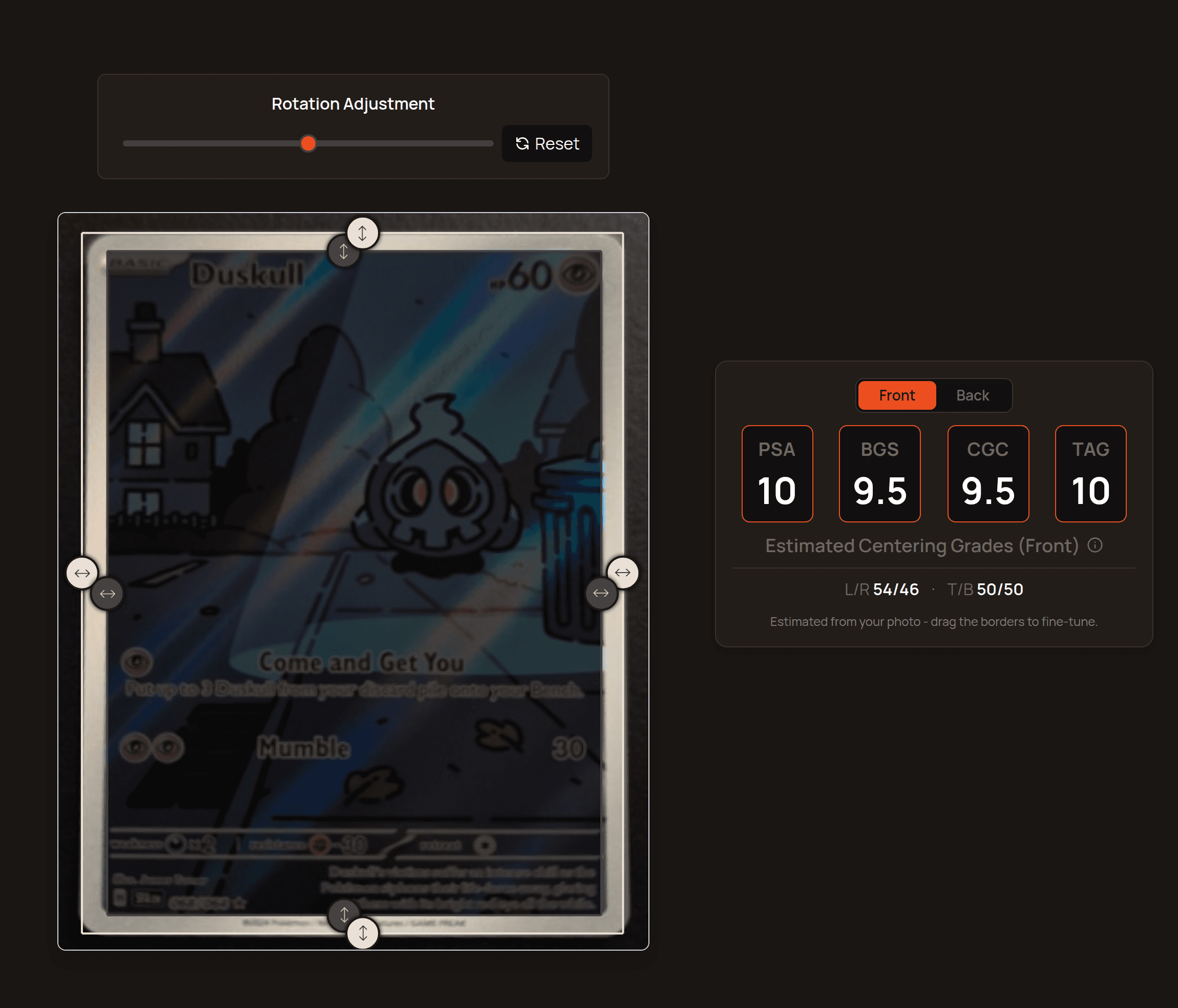
From here you can drag the border handles to line them up exactly with the card, and use the rotation slider to straighten a tilted card. If the tool can't detect the card automatically, you can set the lines yourself - the measurement still works.
Tips for an accurate measurement
- Use even, indirect light and avoid glare or reflections on the surface.
- Shoot against a plain background that contrasts with the card's border.
- Fill the frame with the card and keep all four edges in view.
- Photograph the card as straight-on as you can - or leave Auto-detect on to correct the angle for you.
- If you can, take the card out of its sleeve or toploader to avoid extra edges and reflections.
Reading your results
Centering is shown two ways. The L/R and T/B values are the measured ratios for the left-right and top-bottom borders - the closer to 50/50, the better. The grade cards show the centering subgrade your card would earn from each company, and you can switch between Front and Back.
For each company, your centering grade is the lower of your L/R and T/B grades - a card can't grade better than its weaker axis. Compare every company's exact tolerances on our Grading Standards page.
That's all there is to it - upload a card and see its centering in seconds.